Patients: Difference between revisions
No edit summary Tag: Manual revert |
|||
| (105 intermediate revisions by 4 users not shown) | |||
| Line 1: | Line 1: | ||
[[Category | [[Category:Patients]] | ||
<languages/> | |||
<translate> | |||
<!--T:1--> | |||
The basic information unit is the patient. | |||
Before creating any analytical request, the corresponding patient record must exist. | |||
This will survive the livespan of the request, and will contain all their history. | |||
== | <!--T:2--> | ||
<div style="float:right; margin: 0px 0px 0px 0px"> | |||
[[ | <graphviz border='frame' format='svg' rendered='dot'> | ||
digraph FunctionalitiesDiagram { | |||
# | node [shape=oval style=filled fillcolor=orange fontsize="9pt"]; | ||
# | //----- Patients graph | ||
# | // Nodes | ||
Patients [label="Patients"]; | |||
P_Create [label="Create", URL="#Create"]; | |||
P_Search [label="Search", URL="#Search"]; | |||
P_BasicInformation [label="Basic Information", shape="tab", URL="#Create"]; | |||
P_DocumentationInformation [label="Documentation", shape="tab", URL="#Create"]; | |||
P_BirthData [label="Birth", shape="tab", URL="#Create"]; | |||
P_ContactData [label="Contact", shape="tab", URL="#Create"]; | |||
P_ResidenceData [label="Residency", shape="tab", URL="#Create"]; | |||
P_AdditionalInformation [label="Extra Information", shape="tab", URL="#Create"]; | |||
P_Requests [label="Requests", shape="tab", URL="#Create"]; | |||
// Edges | |||
Patients -> P_Create; | |||
Patients -> P_Search; | |||
P_Create -> P_BasicInformation; | |||
P_Search -> P_BasicInformation; | |||
P_Search -> P_Requests; | |||
P_BasicInformation -> P_DocumentationInformation [dir=both minlen=2]; | |||
P_DocumentationInformation -> P_BirthData [dir=both minlen=2]; | |||
P_BirthData -> P_ContactData [dir=both minlen=2]; | |||
P_ContactData -> P_ResidenceData [dir=both minlen=2]; | |||
P_ResidenceData -> P_AdditionalInformation [dir=both minlen=2]; | |||
{ rank=same; P_BasicInformation P_DocumentationInformation P_BirthData P_ContactData P_ResidenceData P_AdditionalInformation P_Requests} | |||
} | |||
</graphviz> | |||
</div> | |||
== | <!--T:12--> | ||
<!-- | __TOC__ | ||
==Create== <!--T:4--> | |||
<!--T:13--> | |||
This page is divided in a form with the basic information of the patient, involving the obligatory ([[File:Asterisk.PNG|30px]]) entry of the ''name'', ''last name'', ''gender'', ''birth date'' and ''phone'', as well as multiple tabs with additional non-mandatory information. | |||
<!--T:15--> | |||
#Documentation information → Information such as the ''number of clinical history'' or the ''type'' and ''number of an identifier card''. | |||
#Birth information → Complementary information such as the ''birth region'' and ''locality''. Added to the previously introduced ''birth date'' and the automatically calculated ''age'' of the patient. | |||
#Contact information → Additional contact information. | |||
#Residency information → Apart from the basic residency information, it contains a checkbox at the bottom, ''Add provenance region?''. This option is for when a patient, although local, has come from outside the country. When the box is ticked, two more boxes appear on the forms, ''Provenance region'' and ''Provenance city''. [[File:Addprovenanceregion.PNG|750px]] | |||
#Extra information → Other data such as parent's names. The ''Reserved 1, 2 and 3'' are boxes whose names can be modified through the [[System administration|System administration]] if the laboratory requires any specific information from the patients. | |||
#Requests → This actually not a step in the creation or update of the patient, but just a read-only tab containing all the requests of the patient. | |||
<!--T:16--> | |||
Once the mandatory information is entered, the ''Save values'' button at the bottom right of the page will be available. | |||
==Search and Edition== <!--T:6--> | |||
<!--T:7--> | |||
{| class="wikitable" style="margin:auto" | {| class="wikitable" style="margin:auto" | ||
|+ Table found in the Search function of the | |+ Table found in the Search function of the system | ||
|- | |- | ||
! Name !! Phone !! | ! Name !! Phone !! Identification !! Creation Date !! Last Modification Date | ||
|- | |- | ||
| The first column shows the patient's name || The patient's contact number is listed in this column || Here, | | The first column shows the patient's name || The patient's contact number is listed in this column || Here, the internal, automatically generated identification number can be found || This column informs about when the patient's information was first inputted into the system || The last time the patient's information was altered in the system is shown here | ||
|} | |} | ||
Arrows appear next to each heading in the table to manipulate the order the information is showed in. | <!--T:8--> | ||
Arrows appear next to each heading in the table when the mouse is hovered over them to manipulate the order the information is showed in for each heading. | |||
<!--T:9--> | |||
On clicking on any row, a new form will appear with the age, gender, phone and internal identifier of the patient as well as tabs with the information on the patient's documentation information, birth information, contact information, residency information, extra information and requests. From this page, the patient manager or laboratory technician can also edit the patient through the edit patient button at the bottom right of the page. To return to the search patients page, there is a Return button at the bottom left of the screen. | |||
<!--T:10--> | |||
Notice that to avoid inconsistences in the system, patients once created cannot be deleted. | |||
==Duplicate Detection== <!--T:11--> | |||
<!--T:14--> | |||
[[File:Duplicate_patient.mp4|right|500px]] | |||
The e-mail address as well as the Identifier document number are optional. Nevertheless, if provided, they identify a patient (i.e., they do not allow repetitions). | |||
Besides this, to guarantee the existence of an identifier for each patient, a consecutive number is always automatically generated and internally assigned by the system. | |||
<!--T:17--> | |||
Moreover, patients of similar name, parent names, age and telephone number are detected as potential duplicates at creation time. | |||
On happening this, a warning is displayed, and the patient manager or laboratory technician can either modify the corresponding data or move ahead with the creation. | |||
<!--T:18--> | |||
Notice that two patients are not considered similar (i.e., they are considered different) if either: | |||
* Their age difference is greater than ten years, or | |||
* Their name is different enough (more than 50% characters), or | |||
* Their parent names are provided and at least one of them is different enough (more than 30% characters differ considering the three names together), or | |||
* Their telephone numbers are different enough (more than 50% of the digits). | |||
</translate> | |||
Latest revision as of 08:17, 8 May 2025
The basic information unit is the patient. Before creating any analytical request, the corresponding patient record must exist. This will survive the livespan of the request, and will contain all their history.
Create
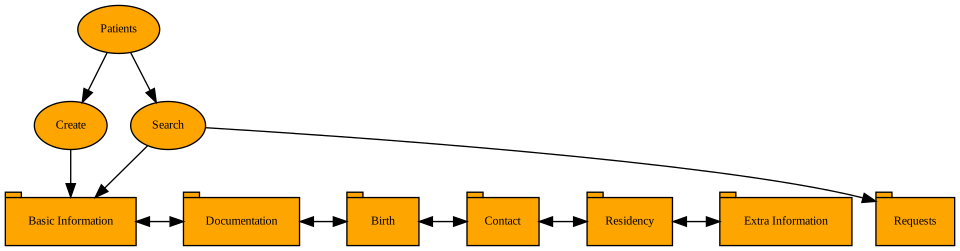
This page is divided in a form with the basic information of the patient, involving the obligatory ( ) entry of the name, last name, gender, birth date and phone, as well as multiple tabs with additional non-mandatory information.
- Documentation information → Information such as the number of clinical history or the type and number of an identifier card.
- Birth information → Complementary information such as the birth region and locality. Added to the previously introduced birth date and the automatically calculated age of the patient.
- Contact information → Additional contact information.
- Residency information → Apart from the basic residency information, it contains a checkbox at the bottom, Add provenance region?. This option is for when a patient, although local, has come from outside the country. When the box is ticked, two more boxes appear on the forms, Provenance region and Provenance city.

- Extra information → Other data such as parent's names. The Reserved 1, 2 and 3 are boxes whose names can be modified through the System administration if the laboratory requires any specific information from the patients.
- Requests → This actually not a step in the creation or update of the patient, but just a read-only tab containing all the requests of the patient.

Once the mandatory information is entered, the Save values button at the bottom right of the page will be available.
Search and Edition
| Name | Phone | Identification | Creation Date | Last Modification Date |
|---|---|---|---|---|
| The first column shows the patient's name | The patient's contact number is listed in this column | Here, the internal, automatically generated identification number can be found | This column informs about when the patient's information was first inputted into the system | The last time the patient's information was altered in the system is shown here |
Arrows appear next to each heading in the table when the mouse is hovered over them to manipulate the order the information is showed in for each heading.
On clicking on any row, a new form will appear with the age, gender, phone and internal identifier of the patient as well as tabs with the information on the patient's documentation information, birth information, contact information, residency information, extra information and requests. From this page, the patient manager or laboratory technician can also edit the patient through the edit patient button at the bottom right of the page. To return to the search patients page, there is a Return button at the bottom left of the screen.
Notice that to avoid inconsistences in the system, patients once created cannot be deleted.
Duplicate Detection
The e-mail address as well as the Identifier document number are optional. Nevertheless, if provided, they identify a patient (i.e., they do not allow repetitions). Besides this, to guarantee the existence of an identifier for each patient, a consecutive number is always automatically generated and internally assigned by the system.
Moreover, patients of similar name, parent names, age and telephone number are detected as potential duplicates at creation time. On happening this, a warning is displayed, and the patient manager or laboratory technician can either modify the corresponding data or move ahead with the creation.
Notice that two patients are not considered similar (i.e., they are considered different) if either:
- Their age difference is greater than ten years, or
- Their name is different enough (more than 50% characters), or
- Their parent names are provided and at least one of them is different enough (more than 30% characters differ considering the three names together), or
- Their telephone numbers are different enough (more than 50% of the digits).