System administration: Difference between revisions
Jump to navigation
Jump to search
No edit summary |
No edit summary |
||
| Line 1: | Line 1: | ||
[[Category:ARIS:System administration]] | [[Category:ARIS:System administration]] | ||
[[ | <div style="float:right; margin: 0px 0px 0px 0px"> | ||
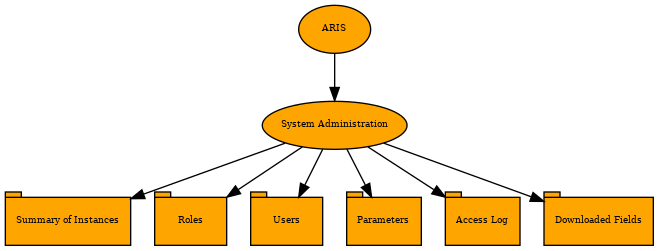
<graphviz border='frame' format='png'> | |||
digraph FunctionalitiesDiagram { | |||
node [shape="oval" style=filled fillcolor="orange" fontsize="7pt"] | |||
//----- System Administration graph | |||
// Nodes | |||
SystemAdministration [label="System Administration", URL="Main_Page" ] | |||
SummaryOfInstances [label="Summary of Instances", URL="Main_Page", shape="tab" ] | |||
Roles [label="Roles", URL="Main_Page", shape="tab" ] | |||
Users [label="Users", URL="Main_Page", shape="tab" ] | |||
Parameters [label="Parameters", URL="Main_Page", shape="tab" ] | |||
AccessLog [label="Access Log", URL="Main_Page", shape="tab" ] | |||
DownloadedFields [label="Downloaded Fields", URL="Main_Page", shape="tab" ] | |||
// Edges | |||
ARIS -> SystemAdministration | |||
SystemAdministration -> SummaryOfInstances | |||
SystemAdministration -> Roles | |||
SystemAdministration -> Users | |||
SystemAdministration -> Parameters | |||
SystemAdministration -> AccessLog | |||
SystemAdministration -> DownloadedFields | |||
} | |||
</graphviz> | |||
</div> | |||
[[File:Summaryofinstancessmol.PNG|right|250px|thumb|Summary of instances]] | [[File:Summaryofinstancessmol.PNG|right|250px|thumb|Summary of instances]] | ||
Revision as of 22:33, 1 March 2023

Summary of instances
This tab is composed of three tables, Data, Administration and Configuration. These display the information from the functionalities of the same name on the app. Some examples are: the number of patients, users, requests or genders. This information will be updated after every modification in the application automatically.
Roles
This tab is displayed and works, in the same way as the state of the request tab in the Configuration functionality. The roles are unchangeable but, the laboratory can choose the labels of these roles.
Users

When clicking on the edit or New user buttons, a form pops up on the screen. The information necessary to create a user consists of a Username, Name, Middle name, password and the person's Role within the app.