MobileApp:User Guide: Difference between revisions
No edit summary |
No edit summary |
||
| Line 9: | Line 9: | ||
[[File:App_main.jpg|200px|thumb|center|Caption]] | [[File:App_main.jpg|200px|thumb|center|Caption]] | ||
First, you need to download the worklist that is available in the ARIS system. To do this, click on the NEW WORKLIST button. | First, you need to download the worklist that is available in the ARIS system. To do this, click on the '''NEW WORKLIST''' button. | ||
From there we will have a screen to choose the Bluetooth devices. | From there we will have a screen to choose the Bluetooth devices. | ||
In order for the connection between the computer with the ARIS system and the mobile device to exist, they must be close to each other and both must have the Bluetooth turned on and previously paired. For this, we must click on the device where the ARIS system is being executed and enabled. | In order for the connection between the computer with the ARIS system and the mobile device to exist, they must be close to each other and both must have the Bluetooth turned on and previously paired. For this, we must click on the device where the ARIS system is being executed and enabled. | ||
Revision as of 10:54, 16 May 2023
User Manual[edit]
On the first use of the application, it will require permissions for location, camera, Bluetooth, and internal storage. For the correct use of the APP, it is necessary to accept all of them. It is worth remembering that the application does not save sensitive data. See the Privacy Policy.
On the application's main screen, we have 3 buttons: SYNC ARIS, SAVED WORKLIST, and NEW WORKLIST. As the Figure below shows.

First, you need to download the worklist that is available in the ARIS system. To do this, click on the NEW WORKLIST button. From there we will have a screen to choose the Bluetooth devices. In order for the connection between the computer with the ARIS system and the mobile device to exist, they must be close to each other and both must have the Bluetooth turned on and previously paired. For this, we must click on the device where the ARIS system is being executed and enabled.
ARIS Bluetooth states[edit]

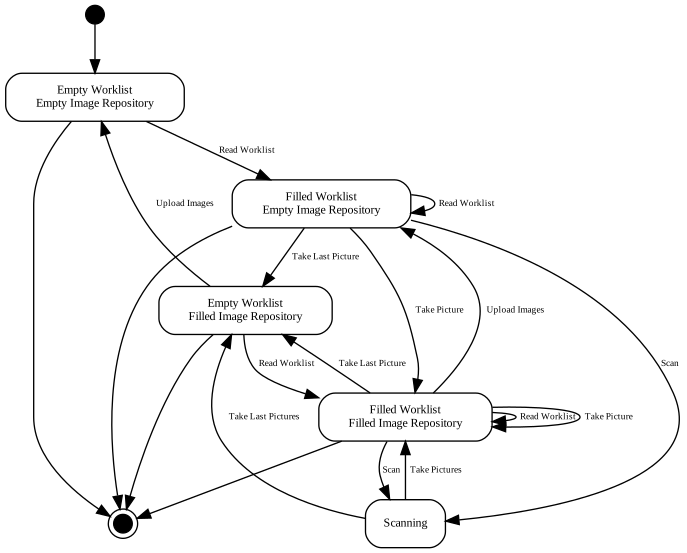
Mobile app states[edit]